
INSIGHTS
Touch Everywhere: Apple's Touchscreen MacBook Pro and the Future of Multi-Touch
DISPLAX Team | October 29, 2026 | 5min
On 28 October 2026, Apple introduced its first Mac with a touchscreen. For a company that kept touch off its laptops for almost two decades, it is a notable change of course. It also confirms something the display industry has seen coming for years: people now expect to reach out and touch every screen, whatever its size.
On 28 October 2026, Apple introduced its first Mac with a touchscreen. For a company that kept touch off its laptops for almost two decades, it is a notable change of course. It also confirms something the display industry has seen coming for years: people now expect to reach out and touch every screen, whatever its size.
The new MacBook Pro will not make laptop touch universal overnight. But it does remove the last major holdout among personal computers. For anyone who designs for interactive screens, from a 14 inch laptop to a 20 metre video wall, the direction is clear: touch everywhere. DISPLAX has been bringing that experience to large screens since 2010.
Apple's first touchscreen MacBook Pro: what Apple launched
Apple's first touchscreen MacBook Pro: what Apple launched
The MacBook Pro with PROLED XDR Display comes in 14 inch and 16 inch sizes and is on sale now. The touch sensor is built into a tandem OLED panel, and macOS translates touches into clicks, so many existing apps work with touch from day one. Apple also redesigned the hinge to keep the screen steady when it is pressed.
The MacBook Pro with PROLED XDR Display comes in 14 inch and 16 inch sizes and is on sale now. The touch sensor is built into a tandem OLED panel, and macOS translates touches into clicks, so many existing apps work with touch from day one. Apple also redesigned the hinge to keep the screen steady when it is pressed.
Apple positions touch as an extra way to work alongside the keyboard and trackpad, not a replacement for them. Its showcase uses are hands-on, creative tasks: moving through video, manipulating 3D models and playing instruments directly on screen.
Who invented multi-touch? A short history
Who invented multi-touch? A short history
Multi-touch is older than most people think. Researchers at the University of Toronto and Bell Labs were building multi-touch systems in the early 1980s. Even so, almost every touch surface deployed in the decades that followed could register only one touch at a time.
That changed in 2007. The iPhone was not the first phone with a capacitive touchscreen; LG announced its Prada phone a month earlier. But the iPhone was the device that made multi-finger capacitive touch mainstream. Shipments of projected-capacitive sensors went from a handful in 2006 to more than 35 million in 2008. Pinch, swipe and tap became a universal language.
Laptops followed quickly on Windows: HP shipped a consumer multi-touch notebook in 2008. Even so, only 20 - 25% of notebooks have touch today. On the laptop, Apple is following rather than leading.

Large-format multi-touch: PCAP on big screens
Large-format multi-touch: PCAP on big screens
Once the smartphone taught people to use several fingers at once, they expected the same from every screen they met: in shops, museums, meeting rooms and classrooms. Large screens were harder. Projected-capacitive (PCAP) sensing worked well at phone size, but scaling it to a wall-sized display meant solving new problems in sensor design, electrical noise and processing speed.
DISPLAXwas one of the first companies to bring PCAP multi-touch to large-format screens. It unveiled its multi-touch technology at ISE in February 2010, and brought its large-format multi-touch film to market in September 2011.
Since then, the technology has grown with demand:
- Sensors from 7 to 135 inches, as film or on glass;
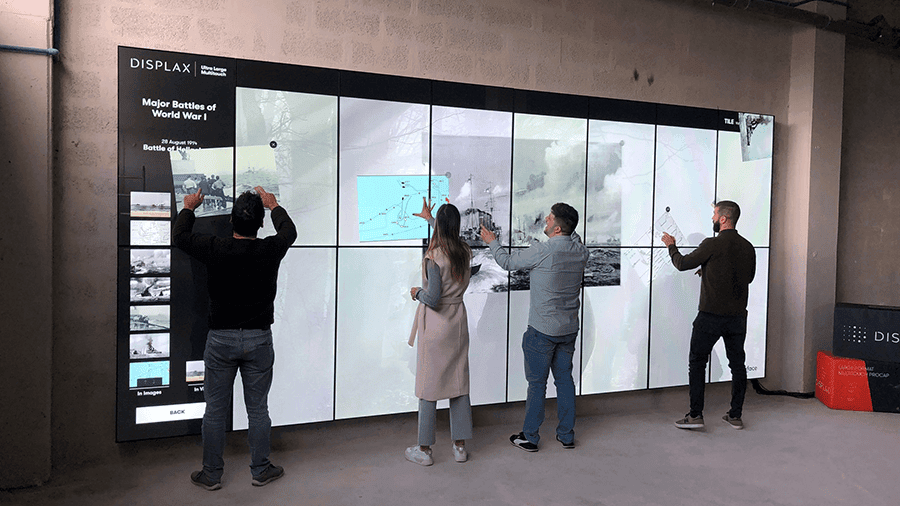
- Up to 100 simultaneous touches, so several people can work on the same screen;
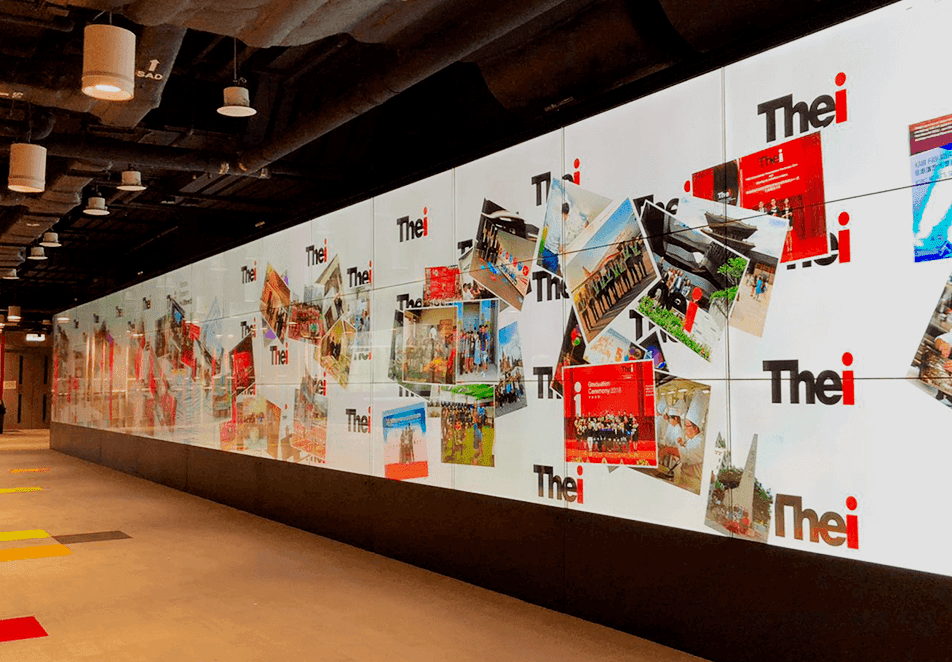
- In 2019, a PCAP touch video wall in Hong Kong spanning 48 displays and 20 metres.
- Sensors from 7 to 135 inches, as film or on glass;
- Up to 100 simultaneous touches, so several people can work on the same screen;
- In 2019, a PCAP touch video wall in Hong Kong spanning 48 displays and 20 metres.
That is why Apple's move matters beyond the laptop. Today DISPLAX SKIN Touch Sensors bring PCAP touch to kiosks, tables and shop windows, while TILE and TILE Pro displays join into video walls where a whole group can touch at once, most recently in The Musical Crossroads table at the Grammy Museum in Los Angeles, California. When phones, laptops and walls all respond to a finger, people stop asking whether a screen is touch and simply expect it to be.
The future of multi-touch: three trends
The future of multi-touch: three trends
Touch is already the main interface for about 5.1 billion smartphone users. Three trends point to where it goes next.
1.Every screen becomes a touchscreen.With touch now on every major computing platform, a screen you cannot touch starts to look dated. That expectation follows users from their phone and laptop to the kiosk, the meeting-room display and the store window.
2.Touch works alongside other inputs.Apple pairs touch with keyboard, trackpad and an AI assistant, and voice-driven AI agents are a leading interface trend for 2026. Even cars are bringing back physical buttons for critical controls. The future is multimodal, with touch as the natural choice for anything visual, shared and hands-on.
3.Large screens are shared screens.A laptop has one user; a wall, table or kiosk has many. Multi-user touch at large sizes is where interaction becomes collaborative, and where the experience built since 2010 matters most.
Apple's touchscreen Mac is less a revolution than a confirmation. Multi-touch was born in research labs in the 1980s, reached millions of pockets with the smartphone in 2007, and spread to tablets, watches, cars and Windows laptops. The Mac was one of the last mainstream screens you could not touch. That exception has now gone.
The real shift is in expectations. Someone who pinches, swipes and taps all day on a phone and a laptop will reach for any screen in front of them: a kiosk in a shop, a display in a meeting room, a wall in a museum. A screen that does not respond feels broken, not neutral. That puts the pressure on every interactive space to deliver touch that is fast, precise and ready for more than one person at a time.
That is the ground DISPLAX has worked on for more than fifteen years: taking the multi-touch people know from their personal devices and making it work at any size, for many hands at once. Now even the most reluctant laptop maker agrees that people want to touch their screens. The next step is making sure every screen, however large, is ready for it.
Ready to bring multi-touch to a bigger screen?
Ready to bring multi-touch to a bigger screen?
Ready to bring multi-touch to a bigger screen?Get in touch with the DISPLAX team to talk through your project or compare configurations.
Get in touch with the DISPLAX team to talk through your project or compare configurations.
FAQs
INSIGHTS
INSIGHTS
Touch Everywhere: Apple's Touchscreen MacBook Pro and the Future of Multi-Touch
Touch Everywhere: Apple's Touchscreen MacBook Pro and the Future of Multi-Touch
DISPLAX Team | October 29, 2026 | 5min
On 28 October 2026, Apple introduced its first Mac with a touchscreen. For a company that kept touch off its laptops for almost two decades, it is a notable change of course. It also confirms something the display industry has seen coming for years: people now expect to reach out and touch every screen, whatever its size.
On 28 October 2026, Apple introduced its first Mac with a touchscreen. For a company that kept touch off its laptops for almost two decades, it is a notable change of course. It also confirms something the display industry has seen coming for years: people now expect to reach out and touch every screen, whatever its size.
On 28 October 2026, Apple introduced its first Mac with a touchscreen. For a company that kept touch off its laptops for almost two decades, it is a notable change of course. It also confirms something the display industry has seen coming for years: people now expect to reach out and touch every screen, whatever its size.
On 28 October 2026, Apple introduced its first Mac with a touchscreen. For a company that kept touch off its laptops for almost two decades, it is a notable change of course. It also confirms something the display industry has seen coming for years: people now expect to reach out and touch every screen, whatever its size.
Apple's first touchscreen MacBook Pro: what Apple launched
Apple's first touchscreen MacBook Pro: what Apple launched
The MacBook Pro with PROLED XDR Display comes in 14 inch and 16 inch sizes and is on sale now. The touch sensor is built into a tandem OLED panel, and macOS translates touches into clicks, so many existing apps work with touch from day one. Apple also redesigned the hinge to keep the screen steady when it is pressed.
The MacBook Pro with PROLED XDR Display comes in 14 inch and 16 inch sizes and is on sale now. The touch sensor is built into a tandem OLED panel, and macOS translates touches into clicks, so many existing apps work with touch from day one. Apple also redesigned the hinge to keep the screen steady when it is pressed.
Apple positions touch as an extra way to work alongside the keyboard and trackpad, not a replacement for them. Its showcase uses are hands-on, creative tasks: moving through video, manipulating 3D models and playing instruments directly on screen.
Apple positions touch as an extra way to work alongside the keyboard and trackpad, not a replacement for them. Its showcase uses are hands-on, creative tasks: moving through video, manipulating 3D models and playing instruments directly on screen.
Who invented multi-touch? A short history
Who invented multi-touch? A short history
Multi-touch is older than most people think. Researchers at the University of Toronto and Bell Labs were building multi-touch systems in the early 1980s. Even so, almost every touch surface deployed in the decades that followed could register only one touch at a time.
Multi-touch is older than most people think. Researchers at the University of Toronto and Bell Labs were building multi-touch systems in the early 1980s. Even so, almost every touch surface deployed in the decades that followed could register only one touch at a time.
That changed in 2007. The iPhone was not the first phone with a capacitive touchscreen; LG announced its Prada phone a month earlier. But the iPhone was the device that made multi-finger capacitive touch mainstream. Shipments of projected-capacitive sensors went from a handful in 2006 to more than 35 million in 2008. Pinch, swipe and tap became a universal language.
That changed in 2007. The iPhone was not the first phone with a capacitive touchscreen; LG announced its Prada phone a month earlier. But the iPhone was the device that made multi-finger capacitive touch mainstream. Shipments of projected-capacitive sensors went from a handful in 2006 to more than 35 million in 2008. Pinch, swipe and tap became a universal language.
Laptops followed quickly on Windows: HP shipped a consumer multi-touch notebook in 2008. Even so, only 20 - 25% of notebooks have touch today. On the laptop, Apple is following rather than leading.
Laptops followed quickly on Windows: HP shipped a consumer multi-touch notebook in 2008. Even so, only 20 - 25% of notebooks have touch today. On the laptop, Apple is following rather than leading.
Large-format multi-touch: PCAP on big screens
Large-format multi-touch: PCAP on big screens
Once the smartphone taught people to use several fingers at once, they expected the same from every screen they met: in shops, museums, meeting rooms and classrooms. Large screens were harder. Projected-capacitive (PCAP) sensing worked well at phone size, but scaling it to a wall-sized display meant solving new problems in sensor design, electrical noise and processing speed.
Once the smartphone taught people to use several fingers at once, they expected the same from every screen they met: in shops, museums, meeting rooms and classrooms. Large screens were harder. Projected-capacitive (PCAP) sensing worked well at phone size, but scaling it to a wall-sized display meant solving new problems in sensor design, electrical noise and processing speed.
Once the smartphone taught people to use several fingers at once, they expected the same from every screen they met: in shops, museums, meeting rooms and classrooms. Large screens were harder. Projected-capacitive (PCAP) sensing worked well at phone size, but scaling it to a wall-sized display meant solving new problems in sensor design, electrical noise and processing speed.
Once the smartphone taught people to use several fingers at once, they expected the same from every screen they met: in shops, museums, meeting rooms and classrooms. Large screens were harder. Projected-capacitive (PCAP) sensing worked well at phone size, but scaling it to a wall-sized display meant solving new problems in sensor design, electrical noise and processing speed.
Since then, the technology has grown with demand:
Since then, the technology has grown with demand:
- Sensors from 7 to 135 inches, as film or on glass;
- Up to 100 simultaneous touches, so several people can work on the same screen;
- In 2019, a PCAP touch video wall in Hong Kong spanning 48 displays and 20 metres.
- Sensors from 7 to 135 inches, as film or on glass;
- Up to 100 simultaneous touches, so several people can work on the same screen;
- In 2019, a PCAP touch video wall in Hong Kong spanning 48 displays and 20 metres.
That is why Apple's move matters beyond the laptop. Today DISPLAX SKIN Touch Sensors bring PCAP touch to kiosks, tables and shop windows, while TILE and TILE Pro displays join into video walls where a whole group can touch at once, most recently in TheMusical Crossroads table at the Grammy Museum in Los Angeles, California. When phones, laptops and walls all respond to a finger, people stop asking whether a screen is touch and simply expect it to be.
That is why Apple's move matters beyond the laptop. Today DISPLAX SKIN Touch Sensors bring PCAP touch to kiosks, tables and shop windows, while TILE and TILE Pro displays join into video walls where a whole group can touch at once, most recently in TheMusical Crossroads table at the Grammy Museum in Los Angeles, California. When phones, laptops and walls all respond to a finger, people stop asking whether a screen is touch and simply expect it to be.
The future of multi-touch: three trends
The future of multi-touch: three trends
Touch is already the main interface for about 5.1 billion smartphone users. Three trends point to where it goes next.
1.Every screen becomes a touchscreen.With touch now on every major computing platform, a screen you cannot touch starts to look dated. That expectation follows users from their phone and laptop to the kiosk, the meeting-room display and the store window.
2.Touch works alongside other inputs.Apple pairs touch with keyboard, trackpad and an AI assistant, and voice-driven AI agents are a leading interface trend for 2026. Even cars are bringing back physical buttons for critical controls. The future is multimodal, with touch as the natural choice for anything visual, shared and hands-on.
3.Large screens are shared screens.A laptop has one user; a wall, table or kiosk has many. Multi-user touch at large sizes is where interaction becomes collaborative, and where the experience built since 2010 matters most.
Apple's touchscreen Mac is less a revolution than a confirmation. Multi-touch was born in research labs in the 1980s, reached millions of pockets with the smartphone in 2007, and spread to tablets, watches, cars and Windows laptops. The Mac was one of the last mainstream screens you could not touch. That exception has now gone.
The real shift is in expectations. Someone who pinches, swipes and taps all day on a phone and a laptop will reach for any screen in front of them: a kiosk in a shop, a display in a meeting room, a wall in a museum. A screen that does not respond feels broken, not neutral. That puts the pressure on every interactive space to deliver touch that is fast, precise and ready for more than one person at a time.
That is the ground DISPLAX has worked on for more than fifteen years: taking the multi-touch people know from their personal devices and making it work at any size, for many hands at once. Now even the most reluctant laptop maker agrees that people want to touch their screens. The next step is making sure every screen, however large, is ready for it.
Ready to bring multi-touch to a bigger screen?
Ready to bring multi-touch to a bigger screen?
Ready to bring multi-touch to a bigger screen?Get in touch with the DISPLAX team to talk through your project or compare configurations.
Get in touch with the DISPLAX team to talk through your project or compare configurations.
FAQs
NEWS & INSIGHTS
Keep reading

INSIGHTS
INSIGHTS
Projected Capacitive Touch Trends 2025–2035: Growth, Innovation & Market Drivers
DISPLAX Team
July 31, 2025 | 6 min

INSIGHTS
Compare SKIN ZEETO with Zytronic ZXY100 & ZXY500
Compare SKIN ZEETO with Zytronic ZXY100 & ZXY500
DISPLAX Team
July 22, 2025 | 5 min

INSIGHTS
INSIGHTS
How to Choose the Right PCAP Touchscreen Manufacturer in 2025
How to Choose the Right PCAP Touchscreen Manufacturer in 2025
DISPLAX Team
June 24, 2025 | 5 min
NEWS & INSIGHTS
Keep reading
INSIGHTS
INSIGHTS
Projected Capacitive Touch Trends 2025–2035: Growth, Innovation & Market Drivers
Projected Capacitive Touch Trends 2025–2035: Growth, Innovation & Market Drivers
DISPLAX Team
July 31, 2025 | 6 min
INSIGHTS
Compare SKIN ZEETO with Zytronic ZXY100 & ZXY500
Compare SKIN ZEETO with Zytronic ZXY100 & ZXY500
DISPLAX Team
July 22, 2025 | 5 min
NEWS
How to Choose the Right PCAP Touchscreen Manufacturer in 2025
How to Choose the Right PCAP Touchscreen Manufacturer in 2025
DISPLAX Team
June 24, 2025 | 5 min

Get in Touch
Questions about pricing? Got an active project you’d like to discuss? Let’s connect.
Get in Touch
Questions about pricing? Got an active project you’d like to discuss? Let’s connect.








